The Complete Guide to Digital Signage
Digital signage is the use of screens to display dynamic content, from menus and promotions to wayfinding and announcements. This guide covers everything you need to know to get started.
What is Digital Signage?
Digital signage is the use of screens, LCD monitors, LED displays, video walls, and interactive kiosks, to present dynamic content to a targeted audience. Unlike printed signs, digital signage can be updated instantly from anywhere, allowing businesses to display the right message at the right time without printing costs or delays.
You’ll find digital signage in retail stores, corporate offices, airports, hospitals, restaurants, schools, and outdoor environments. Any place that communicates with people can benefit from it.
How Does Digital Signage Work?
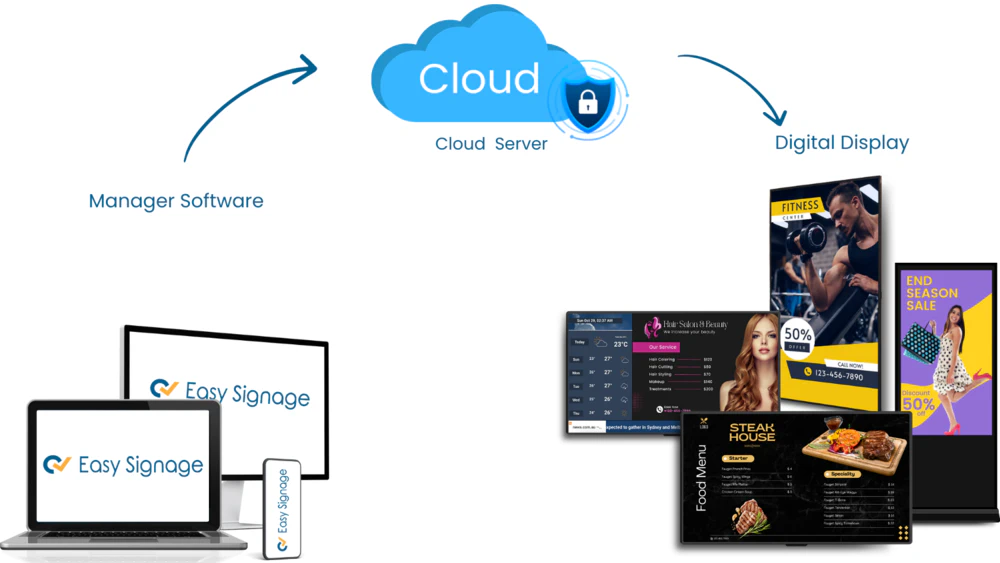
Digital signage runs on a content management system (CMS); software that lets you create, schedule, and publish content to one or more screens remotely. You upload your media, build a playlist, and assign it to your screens. Changes go live immediately, with no need to physically access the display.
Content can include images, videos, live news feeds, social media walls, menus, event schedules, wayfinding maps, QR codes, and more. Screens can be grouped and managed individually or together, making it easy to run different content across multiple locations from a single dashboard.
Why is Digital Signage Important for Businesses?
Digital signage gives businesses a flexible, always-on communication channel that static signs simply cannot match. Key reasons businesses adopt it include:
- Real-time updates: Change prices, promotions, or announcements instantly across all screens.
- Consistent branding: Maintain a unified visual identity across every location.
- Reduced operational costs: Eliminate recurring printing, shipping, and installation costs.
- Increased engagement: Dynamic content captures more attention than static displays.
- Scalability: Add screens and locations without adding complexity to your workflow.
What are the Benefits of Digital Signage?
Audience engagement
Dynamic visuals, motion, colour, and high-resolution imagery, capture attention far more effectively than static signs. This leads to higher message recall, increased dwell time, and better customer experiences.
Targeted content delivery
Digital signage lets you deliver different content to different audiences, locations, and times of day. A retail store can promote breakfast items in the morning and switch to dinner specials in the evening, all automated.
Cost-effectiveness
While there is an upfront investment in hardware and software, businesses quickly recover costs by eliminating ongoing print expenses. Content changes that once required a printer and a site visit now take seconds.
Sustainability
Digital signage eliminates paper waste and chemical inks from the printing process, making it a more environmentally responsible alternative to traditional signage.
What Hardware Can Be Used for Digital Signage?
Digital signage works with a wide range of hardware. The right choice depends on your environment, budget, and content needs.
TV or monitor + media player, The most accessible option. Connect any TV to a small media player (such as an Android box or Amazon Fire Stick) and run the signage software on it.
Professional signage displays, Commercial screens with built-in players from brands like Samsung (Tizen), LG (webOS), and Philips are purpose-built for always-on operation. See all supported players.
Touchscreen & interactive kiosks, Touch-enabled displays for self-service, wayfinding, or customer-facing applications.
Video walls, Multiple screens tiled together for large-format, high-impact displays in lobbies, retail, or event spaces.
Outdoor displays, Weatherproof, high-brightness screens designed for direct sunlight and outdoor environments.
LED panels, Modular, scalable panels ideal for large indoor or outdoor installations such as stadiums and storefronts.
Why Choose EasySignage?
EasySignage is a cloud-based digital signage platform designed to be straightforward to set up and easy to manage, whether you run one screen or thousands.
- Broad hardware support: Works with Android, Amazon Fire TV, Samsung Tizen, LG webOS, Philips, Raspberry Pi, Windows, and more. View all supported players.
- Rich content apps: Over 30 built-in apps including Google Slides, Canva, Google Sheets, social walls, IPTV, background music, and interactive kiosk tools.
- Cloud management: Update content from any device, from anywhere, at any time.
- Free to start: EasySignage includes one free screen forever. No credit card required.
Ready to Get Started?
Digital signage is one of the most effective ways to communicate with your audience, whether you’re a small café, a corporate office, or a multi-location retail chain. The technology is accessible, affordable, and increasingly expected by customers and visitors alike.
EasySignage makes it simple to go from zero to a live screen in minutes. Start for free and see the difference dynamic content can make.
Get your 1st screen for free. No credit card needed.