Event & Conference Signage
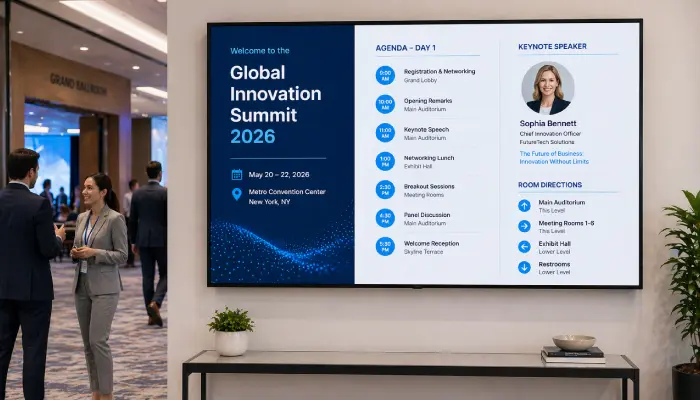
Display agendas, speaker info, room directions, and sponsor logos at conferences, trade shows, and corporate events from one dashboard.
- Event agenda and session schedules
- Speaker profiles and room assignments
- Sponsor logo displays
- Countdown timers to key sessions

Perfect for
Event organizers, conference planners, and corporate teams running live events and trade shows.
How it works
Set up your first screen in minutes. No technical skills required.
Set up your venue screens
Install EasySignage on any screen throughout the venue, Android, Samsung, LG, and more.
Build your event content
Create agendas, speaker profiles, sponsor logos, and wayfinding screens.
Schedule and publish
Assign content to specific screens and schedule it by time slot. Each area of the venue shows the right information automatically.
Update in real time
Push last-minute schedule changes, room reassignments, or emergency announcements to all screens in seconds.

Why Use Digital Event Signage?
Digital event signage keeps attendees informed, reduces confusion, and delivers a professional experience that reflects well on your brand.
Live Agenda from Google Calendar
Pull your event schedule directly from Google Calendar and display it on all venue screens automatically.
Multi-Zone Layouts
Split screens to show the session agenda alongside a live social feed, sponsor logo, or countdown timer, all on one display.
Sponsor Recognition
Display sponsor logos and branded content on dedicated screens or as part of a rotating layout.
Room Direction Screens
Guide attendees to the right rooms with clear directional screens at key decision points in the venue.
No Printing, No Waste
Replace printed agendas, foam boards, and directional signs with dynamic screens.
Same-Day Updates
Push last-minute schedule changes, room reassignments, or announcements to all screens in seconds.
Recommended apps
These EasySignage apps work best for event & conference signage.
Frequently asked questions
Ready to get started?
Set up your first event & conference signage in under 10 minutes.
Start for Free — 1 Screen ForeverNo credit card required. FREE for 1 screen!