Logo
English Español
  • Help Centre
  • Contact Us
  • Español
  • Sign In
Help centre
  • Dashboard 1
  • Registration and Login 1
  • Installation 21
  • Playlists 12
    • 1 - Playlist Management
    • 2 - Playlist Media Management
    • 3 - Playlist Media Settings
    • 4 - Layout Customization
    • 5 - Touch Screen Features
    • 6 - Sync your Playlist Playback
    • 7 - Control Media Playback by Tags
    • 8 - Media Lifetime
    • 9 - Channels
    • 10 - Volume Control
    • 11- Playlist & Layer Resolution
    • 12 - Lock Layer
  • Apps 52
  • Templates 2
  • Media Assets 1
  • Schedules 1
  • Screens 10
  • Video Wall 1
  • Media Playback Quota 1
  • Proof Of Play 1
  • Settings 9
  • Licences and Billing 1
  • Languages 1
  • User Management 2
  • Integrations 2
  • Geo Location 1
  • Dynamic Data 1
  • FAQ 1
  • Troubleshoot 4
Help centre
  • Dashboard 1
  • Registration and Login 1
  • Installation 21
  • Playlists 12
    • 1 - Playlist Management
    • 2 - Playlist Media Management
    • 3 - Playlist Media Settings
    • 4 - Layout Customization
    • 5 - Touch Screen Features
    • 6 - Sync your Playlist Playback
    • 7 - Control Media Playback by Tags
    • 8 - Media Lifetime
    • 9 - Channels
    • 10 - Volume Control
    • 11- Playlist & Layer Resolution
    • 12 - Lock Layer
  • Apps 52
  • Templates 2
  • Media Assets 1
  • Schedules 1
  • Screens 10
  • Video Wall 1
  • Media Playback Quota 1
  • Proof Of Play 1
  • Settings 9
  • Licences and Billing 1
  • Languages 1
  • User Management 2
  • Integrations 2
  • Geo Location 1
  • Dynamic Data 1
  • FAQ 1
  • Troubleshoot 4
  1. Help Centre
  2. Playlists
  3. 10 - Volume Control

10 - Volume Control

On this page
  • How to Mute a video in a playlist

The volume of a video or an IPTV channel can be controlled and muted in a playlist.


How to Mute a video in a playlist
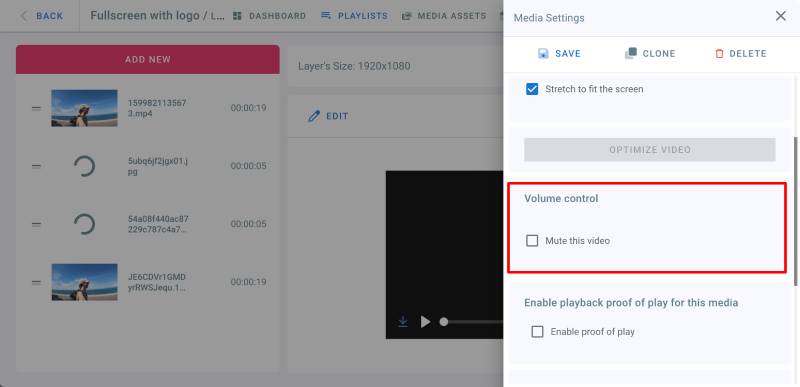
Proof of Play

  • Go to playlists page and click on your playlist
  • Click on a layer
  • Click Edit on the video or IPTV stream you want to mute
  • In the Media Settings panel on the right, under Volume Control, check Mute this Video checkbox.
  • Click on Save

(To unmute the video, uncheck the above checkbox.)


Previous
9 - Channels
Next
11- Playlist & Layer Resolution
On this page
  • How to Mute a video in a playlist
EasySignage — Top Software Product on GoodFirms
EasySignage google partner
EasySignage rated 4.5 out of 5 on Capterra

©  EasySignage. All Rights Reserved.


  • FAQ
  • How-To Hub
  • Download
  • Blog
  • Help
  • Terms & Conditions
  • Privacy Policy
  • Acceptable Use Policy
  • Service Level Agreement
  • HIPAA Compliance
  • Security
  • Instagram
  • Facebook
  • Twitter
  • Linkedin
  • TikTok
Logo

Cookie settings

We use cookies to provide you with the best possible experience. They also allow us to analyze user behavior in order to constantly improve the website for you.