Dynamic URL variables let you insert player‑specific values into URLs automatically.
Use them to send device information to APIs, content feeds, analytics systems, or custom dashboards.
This allows you to:
- Pass player attributes dynamically without manual input
- Personalize data requests per device
- Trigger content rules or API workflows based on screen metadata
- Use custom tags to define business logic (store ID, zone, region, channel, etc.)
Note:
This feature is used with the Website/URL app. See Website/URL App.
Available Variables
| Variable | Description |
|---|---|
{player.id} | Unique EasySignage Player ID |
{player.serial} | Device serial number (if available) |
{player.name} | Player name |
{player.manufacturer} | Device manufacturer (Samsung, LG, Android, etc.) |
{player.osPlatform} | Operating system / platform |
{player.tags.all} | All tags in key:value format, comma‑separated |
{player.tags.key} | Tag value by key (example below) |
Tags are case‑sensitive. Use lowercase keys when possible.
Using Tags
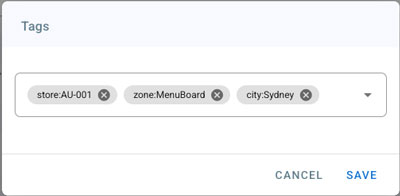
Tags allow you to set custom metadata for each player.
Example tags added to a player:
store:AU‑001
zone:MenuBoard
city:Sydney
| Template | Output |
|---|---|
{player.tags.store} | AU‑001 |
{player.tags.zone} | MenuBoard |
{player.tags.city} | Sydney |
{player.tags.all} | store:AU‑001,zone:MenuBoard,city:Sydney |
Tags are written as
key:value. You can add multiple tags per player.
Example URL Usage
https://example.com/sync?player={player.id}&store={player.tags.store}
Use multiple tag variables
https://example.com/{player.tags.store}/{player.tags.zone}
Send all tags
https://example.com?tags={player.tags.all}
Test Your Variables
You can preview how variables expand using our testing tool:
url-variable-tester.easysignage.com
Example Testing
Template:
https://url-variable-tester.easysignage.com?device={player.id}&store={player.tags.store}
Tester Output Example:
https://url-variable-tester.easysignage.com?device=PL12345&store=AU‑001
Use this tool to verify URL formats before publishing.
Best Practices
- Use lowercase tag keys:
store,zone,channel - Avoid spaces — use
-or_:store‑id:001 - Keep tag values short and clean
- Test URLs using the online tool
Summary
Dynamic variables let you:
- Automate device‑aware content workflows
- Build smart & scalable signage networks
- Integrate with APIs effortlessly