What Are Custom Digital Signage Apps and When Should You Build One?
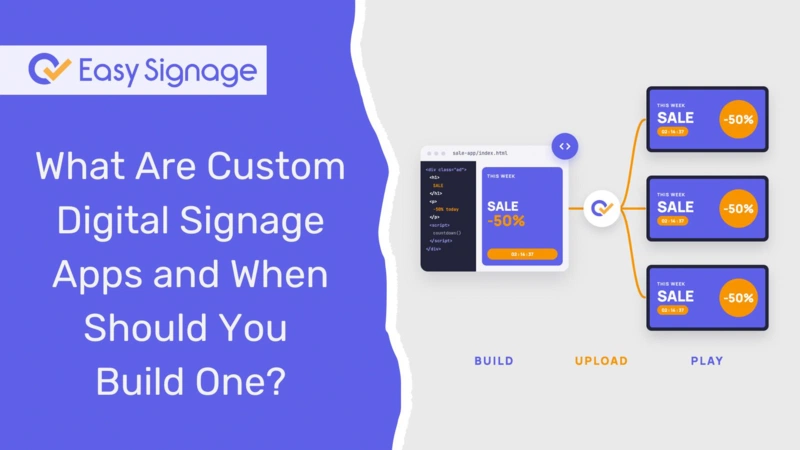
Custom digital signage apps allow you to build your own screen content when existing built-in apps don’t cover what you need. You upload the app once, and it plays on every screen. Each screen displays the version that corresponds to its store, zone, region, or language. Additionally, the app keeps playing even when the internet connection drops.
In EasySignage, a custom app is essentially a small website that your team packages as a .zip file. It plays just like any other media item.
This guide explains what custom apps are, when they make sense, what you can create, and how to get started without writing any code.
What is a Custom Digital Signage App?
A custom digital signage app is your own content, built by your team and displayed on your screens. Think of a branded sales dashboard, a live queue display, or a menu board that pulls prices directly from your own inventory system.
What sets custom apps apart from fixed designs is their ability to adapt to different screens. Each screen communicates its identity and location to the app through what are known as player attributes. These attributes include:
- The screen’s name and ID
- Its resolution
- Its location (when known)
- The playlist it is currently playing
- Any tags assigned to the screen
Tags are simple labels you give your screens, such as zone: north, store: 42, or lang: ar. Your app reads those labels to adjust the content displayed. The result is simple: One app can behave differently on every screen, without you building a separate version for each location.
Custom apps were previously known as Offline HTML in EasySignage. If you used that feature before, this is the same idea with more power behind it.
When should you build a custom app instead of using a built-in app?
EasySignage offers more than 100 ready-made digital signage apps. For most screens, one of these options does the job. Websites, Canva designs, and many everyday formats are already well-supported.
However, a custom app may be a better choice when none of the available options quite fit. Use this as a quick guide to help you decide:
| Situation | Best choice |
|---|---|
| You need a common format, such as a website or a Canva design | Built-in app |
| You want content that updates automatically from a data source | Built-in app or dynamic data |
| You need a fully branded layout your designers control down to the pixel | Custom app |
| Your screens must show data from your own internal system | Custom app |
| One design needs to show different content in different stores or zones | Custom app |
| Screens must keep running in places with weak or unreliable internet | Custom app |
If you are unsure, start with the built-in apps. Move to a custom app when you hit a limit.
What can you build with custom digital signage apps?
If you can visualise it on a screen, it can typically be developed as a custom app. Here are common examples by industry:
Retail: regional promotions from a single app
A retail chain can build one promotion app. Screens labelled for the northern region display the promotion for the north, while screens labelled for the southern region display the south’s promotion. Each store can show its own local pricing. When the promotion changes, the team only needs to update the app once, rather than editing every individual screen.
Service counters: live queue displays
Banks, clinics, government offices, and pharmacies can build a queue display that matches their brand. The app can show the current ticket number, wait times, and service messages in one clean layout.
Offices and factories: KPI and production boards
Operations teams can create a board that displays key performance indicators (KPIs) pulled from their own systems, such as output per shift, safety records, or sales targets. Each floor or department can view its own figures.
Restaurants: menu boards linked to stock data
A restaurant group can implement a digital menu board that reads from its existing stock data. When items are sold out, they automatically disappear from the screen, and each location displays its own prices.
Multilingual venues: the right language on each screen
Airports, hotels, universities, and shopping centres often serve visitors who speak different languages. Tag a screen with lang: ar or lang: fr, and the same application can present content in the selected language.
How can a custom app show different content on each screen?
Every time your app plays, EasySignage sends the screen’s details to it. Your app reads this information and decides what to display.
Here is a simple example:
- You add the tag zone: north to five screens and zone: south to five others.
- Your app checks the tag on the screen it is currently playing.
- Screens in the north zone show the north banner, while screens in the south zone show the south banner.
- Any screen without a zone tag shows a default banner.
Your app can also adjust its layout by screen shape. For example, it can switch to a portrait layout when it runs on a vertical screen.
You can add tags to screens directly within EasySignage. Each screen can have up to 20 tags, and that gives you plenty of room for information like store numbers, zones, floors, languages, and campaign labels.
Do custom apps work offline?
Yes. Everything the app needs is stored on the screen itself. All necessary components like Images, fonts, styles, and code, are all stored inside the package. If the internet drops, your screens will keep playing instead of going blank.
However, there is one exception. Any content that your app pulls in live from an external source still needs an internet connection. A well-designed custom app will display the last known data or provide a fallback message when this situation happens.
This makes custom apps a strong choice for environments with unreliable connections, such as warehouses, remote stores, and mobile kiosks.
How to set up a custom app in EasySignage
You do not need a developer to determine if custom apps are right for you. EasySignage provides a ready-made sample that you can upload and play straight away.
Step 1: Try the sample (no coding required)
- Download the sample package from the Custom Apps help page.
- Sign in to the EasySignage Management Console and go to Media.
- Upload the .zip file.
- Add the media item to a playlist.
- Assign the playlist to a screen.
The sample shows all the details your screen passes to the app. This lets you confirm if it fits your plans before spending time on development.
Step 2: Build your own app
When you are ready, your developer can build the app as a standard website. They need to follow three rules:
- Name the main file index.html and place it at the top level of the .zip file
- Include every image, font, and script within the package
- Use relative paths to link to these files, so the app can function offline
Step 3: Upload and assign
Upload your finished .zip the same way you uploaded the sample. Add it to a playlist, assign it to your screens, and add tags to any screens that need different content.
For the full technical reference, developers can use the Digital Signage Custom Apps help page.
Build your first custom app with EasySignage
Custom apps give you full control over what your screens show, without managing a separate version for every location. Build once, upload once, and let every screen pick up the content that belongs to it.
Explore the Custom Apps page or start your free EasySignage account today.
Frequently asked questions
What is a custom digital signage app?
A custom digital signage app is your own screen content, built as a small website and uploaded to EasySignage as a .zip file. It plays like any other media item and can show different content on each screen based on its name, location, resolution, or tags.
Do I need a developer to use custom apps?
Not to try them. EasySignage provides a ready-made sample you can upload and play without writing code. To build your own app, you will need someone who can create a basic website with HTML, CSS, and JavaScript.
Can one custom app show different content on different screens?
Yes. Each screen passes its details and tags to the app. The app uses them to show the right content for each store, zone, floor, region, or language. You build one app instead of one per location.
Do custom digital signage apps work without internet?
Yes. The whole app is stored on the screen, so it keeps playing during an outage. Only content the app fetches live from an outside source needs a connection.
What is the difference between a custom app and a built-in app?
Built-in apps are ready-made and cover common needs, such as websites and Canva designs. Custom apps are built by your team for needs the built-in apps do not cover, such as data from your own systems or a fully branded layout.
Can I move my Broadsign creatives to EasySignage?
Yes. EasySignage uses the same field names as Broadsign, so most creatives need only a small update rather than a rebuild.
Which EasySignage plans include custom apps?
Custom apps are available on the Premium and Enterprise plans. You can compare what each plan includes on our pricing page.