How to Use Canva AI to Redesign Any Image for Your Signage Screens
Imagine Redesigning a Screen Just by Describing It
What if you could take any image, type “make this look like a cosy winter café,” and instantly watch it transform, then push it live to your screens seconds later? There’s no need for a designer, no requirement for software skills, and no need to start over.
That’s not just a futuristic concept. It’s what you can do right now with Canva AI integrated into EasySignage.
The short answer: Upload any image, open it in the Canva app, describe the change you want in plain words, and Canva AI redesigns it for you. Once you are happy with the transformation, you can publish it directly to your digital signage screens, no downloads, no exports, and no switching between tabs.
This guide will walk you through two powerful features you can use with Canva inside EasySignage:
Edit any image in Canva even images that were not originally created in Canva.
Redesign any image with Canva AI by simply describing your idea in words.
Let’s break down both of these functionalities.
Edit Any Image in Canva, Even If It Wasn’t Created There
Most design tools only allow you to edit files that were created inside that tool itself. However, Canva inside EasySignage works differently.
You can take any image you already have, an old promo banner, a photo from your phone, or a graphic a teammate sent you, and open it in Canva right from your EasySignage dashboard. You don’t need the original Canva file, and you won’t have to start from a template.
Once your image is open in Canva, you’ll have full editing freedom. You can:
Change the background: Swap it out, blur it, or replace it with a new colour or photo.
Delete unwanted items: Remove an object, an old logo, or anything else that no longer fits.
Add text: Insert headlines, prices, dates, or a call to action.
Add images and photos: Include product shots, icons, or your own uploads.
Add design elements: Use shapes, stickers, lines, frames, and graphics to enhance your design.
Adjust colours and branding: Ensure your fonts, colours, and logo align with your brand.
Here’s why this is important:
- No starting from scratch: You can reuse and refresh content you already have.
- No file juggling: Upload, edit, and publish everything in one place.
- No design skills needed: Canva’s drag-and-drop editor is simple enough for anyone on your team to use.
So if you have a flyer from last season’s sale, you can easily drop it into Canva, delete the old date, change the background, add a new headline and your logo, and publish it live on your screens in minutes.
Redesign Any Image with Canva AI (The Game-Changer)
This is the feature we’re most excited about, and it sets EasySignage apart from other digital signage platforms.
Canva recently released Canva AI 2.0, a set of AI tools that let you redesign an image just by describing what you want in plain language. Within EasySignage, you can use Canva AI on any image and publish the result directly to your screens.
What Canva AI Can Do
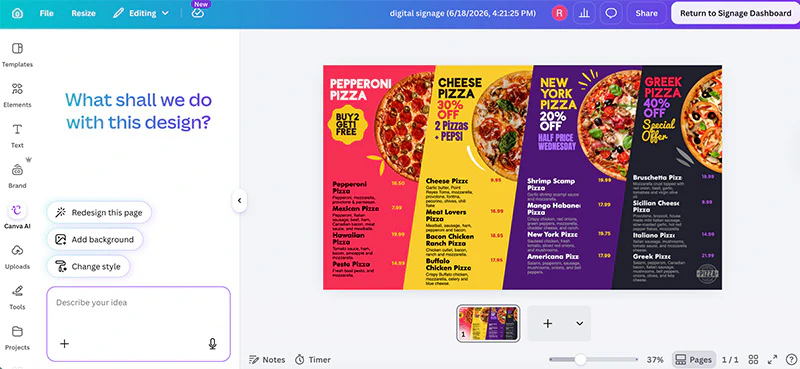
With Canva AI, instead of editing pixel by pixel, you simply describe your idea. For example, you can say:
- “Change the background to a busy coffee shop.”
- “Make this poster look more festive for the holidays.”
- “Replace the product with our new model.”
- “Turn this summer ad into a winter theme.”
Canva AI reads your prompt and redesigns the image to match. You stay in control and can continue to refine the design until it meets your expectations.
A Real Example: A Restaurant Menu
Say you run a restaurant and your menu is displayed on a screen. Here are two common scenarios:
- Updating your prices: Instead of editing each item one by one, simply instruct Canva AI: “Update all prices on this menu to the new amounts.” It will handle the entire menu in one go.
- Creating a holiday theme: If it’s the holiday season and you want a festive look, type: “Turn this menu into a Christmas theme.” Canva AI redesigns the colours, adds seasonal touches, and gives your menu a fresh holiday feel, without any manual design work.
In both cases, you describe the change once, and Canva AI does the heavy lifting. Then, you can publish the updated menu straight to your screens.
The Full Workflow in EasySignage
Here’s how easy it is from start to finish:
Upload any image to EasySignage, or select one from your playlist.
Open the image in the Canva app from your EasySignage dashboard.
Use Canva AI to describe your idea by typing any changes or redesigns you would like.
Apply the AI redesign and make any necessary adjustments until it’s perfect.
Return to Signage Dashoard and choose the export type “Image”.
Publish directly to your screens, no re-uploading required.
That’s it. An image can go from “needs work” to being live on your screens in just a few steps.
Why This Matters for Your Business
- Save hours of design time. No designer or agency needed.
- Keep content fresh. Update your screens for new seasons, sales, or events in minutes.
- Overcome creative block. Stuck on an idea? Describe a rough concept and let AI fill in the rest.
- Stay on brand. Sync your Canva brand kit so logos, fonts, and colours stay consistent.
This is the kind of speed and creativity that used to take a full design team, and now, anyone on your team can do it, straight from EasySignage.
Tips for the Best Results with Canva AI
Be specific: Use detailed instructions like “Add warm sunset lighting” rather than “make it nicer.”
Edit in steps: Make one change at a time to maintain better control over your design.
Start simple: A clear, uncluttered design is more effective on screens.
Match your audience: Keep the style of your design fitting for where the screen is, a clinic, a store, or a school.
Frequently Asked Questions
What is Canva AI?
Canva AI is a collection of artificial intelligence tools available within Canva that allow you to create and redesign images by describing your ideas in plain words. Instead of editing manually, you can type a prompt, and the AI applies the changes for you.
Can I edit images that weren’t made in Canva?
Yes! With the Canva app in EasySignage, you can edit any image, even ones created outside of Canva. Just upload the image and open it in Canva from your dashboard.
Do I need a paid Canva account?
No. Free Canva users can create and publish designs through EasySignage. However, advanced Canva AI features and premium tools require a Canva Pro plan, but you can start using the basic features for free.
Do I have to download or export my image?
No. EasySignage connects directly with Canva. Once your design is ready, you publish it straight to your screens without any downloads or re-uploads.
How fast can I publish a redesigned image?
You can publish a redesigned image in just a few minutes. Upload the image, edit or redesign it with Canva AI, and then publish it directly to your digital signage screens.
Start Redesigning with Canva AI Today
Editing and redesigning images for your digital signage has never been this fast or this easy. With Canva and Canva AI integrated into EasySignage, anyone on your team can turn any image into screen-ready content in minutes.
Try EasySignage for free and start creating smarter signage with Canva AI today.