Custom Apps
When the built-in apps do not cover what you need, build your own. Upload it once and it plays on every screen, showing the right content in each location, and it keeps running when the internet drops.

About This App
EasySignage comes with more than a hundred ready-made apps, and most of the time one of them does the job. Custom Apps are for the times when none of them quite fits.
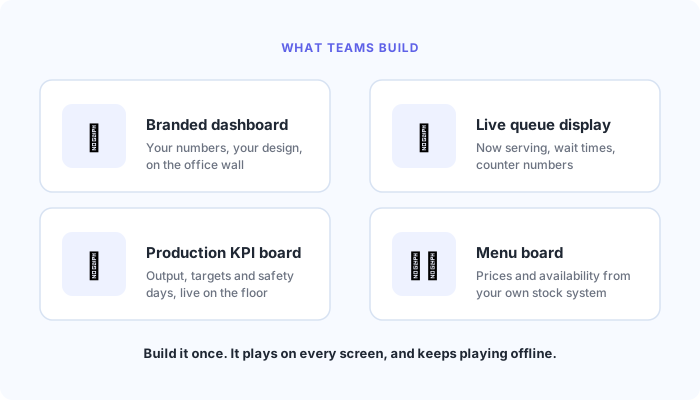
A custom app is something your team builds and uploads to EasySignage, where it plays on your screens like any other piece of media. A branded sales dashboard, a live queue display for a service counter, a production board pulling numbers from your own system, a menu board fed by your existing stock data. If you can picture it on a screen, it can be a custom app.
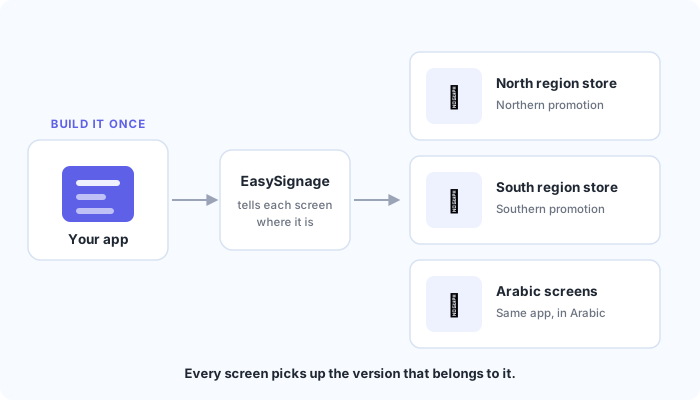
What makes it more than a fixed design is that every screen tells the app where it is. The app knows which screen it is running on, what that screen is called, its resolution, where it is located, and any labels you have given it, such as a store number, a zone, or a language. It uses that to change what it shows.
The practical result is that you build once. A single retail app can show the north region promotion in the north, the south region promotion in the south, local pricing in each store, and Arabic content on the screens you have tagged for it. Upload one thing, and every screen picks up the version that belongs to it. When the promotion changes, you update the app once rather than editing hundreds of screens.
It also keeps working when the connection does not. Everything the app needs is stored on the screen itself, so a dropped internet connection does not blank your displays. Only content your app pulls in live from elsewhere, such as figures from an external system, needs a connection.
You do not need a developer to see whether this suits you. We provide a ready-made sample you can upload and play straight away. It shows you exactly what information your screens are passing through, so you can confirm it fits your plans before committing any development time.
If you are moving across from Broadsign, your existing creatives will feel familiar. EasySignage uses the same naming your team already knows, so a migration is usually a small change rather than a rebuild.
Custom Apps are available on the Premium and Enterprise plans. Your developers can find the full technical reference in Digital Signage Custom Apps , or follow the step by step guide to creating a custom digital signage app .
Key Features
Build exactly what you need when the built-in apps do not cover it
Upload once and play it like any other media item
One app covers hundreds of screens instead of one build per location
Each screen shows the right content for its store, zone, floor, or language
Keeps playing when the internet drops, because everything is stored on the screen
Ideal for branded dashboards, live queue displays, KPI boards, and menu boards driven by your own data
Try a ready-made sample first, before anyone writes a line of code
Moving from Broadsign is straightforward and your existing creatives carry across
Available on the Premium and Enterprise plans
Need help setting up?
Follow the step-by-step setup guide to get started quickly.